Piggy

A tool built for supporting AWS Secret Manager with Kubernetes. It has abilities to mutating Pods, unseal secrets and inject into application environment

Piggy
Piggy is a tool built for supporting AWS Secrets Manager with Kubernetes. It has the ability to mutate Pods, unseal secrets, and inject them into the application environment.
Installation
Current release requires AWS IRSA to provide IAM permissions to Piggy for unsealing secrets. Before installing Piggy Webhooks, you must setup IRSA on AWS. See [https://docs.aws.amazon.com/eks/latest/userguide/iam-roles-for-service-accounts.html] for complete details on setting up IRSA. Alternatively, you can use Terraform to setup IRSA. See [https://github.com/terraform-aws-modules/terraform-aws-eks/tree/master/examples/irsa]
The simplest IRSA Policy for Piggy webhooks
{
  "Version": "2012-10-17",
  "Statement": [
    {
      "Sid": "PiggySecretReadOnly",
      "Action": [
        "secretsmanager:DescribeSecret",
        "secretsmanager:GetResourcePolicy",
        "secretsmanager:GetSecretValue",
        "secretsmanager:ListSecretVersionIds",
        "secretsmanager:ListSecrets"
      ],
      "Effect": "Allow",
      "Resource": "*"
    },
    {
      "Sid": "PiggyECRReadOnly",
      "Action": [
        "ecr:BatchCheckLayerAvailability",
        "ecr:BatchGetImage",
        "ecr:DescribeImages",
        "ecr:GetAuthorizationToken",
        "ecr:GetDownloadUrlForLayer"
      ],
      "Effect": "Allow",
      "Resource": "*"
    }
  ]
}
- Run helm chart install
helm repo add piggysec https://piggysec.com
helm -n piggy-webhooks install piggy-webhooks piggysec/piggy-webhooks --set aws.roleArn=${piggy-role-arn}
- Add these minimum annotations to your Deployment
apiVersion: v1
kind: Pod
metadata:
  annotations:
    piggysec.com/piggy-address: https://piggy-webhooks.piggy-webhooks.svc.cluster.local
    piggysec.com/aws-secret-name: ${your-aws-secret-name} ## e.g. myapp/sample/production
    piggysec.com/aws-region: ${your-aws-secret-region} ## e.g. ap-southeast-1
You can define a default AWS region by setting AWS_REGION environment value in Piggy Webhooks
- Add Env value with format
piggy:${name}
containers:
  env:
    - name: TEST_ENV
      value: piggy:TEST_ENV
- That’s it! See the demo at [https://github.com/KongZ/piggy/tree/main/demo]
Default settings
Some settings, such as the AWS region, can have default values set via the env in the Piggy Webhooks Helm chart values.
Simply remove the piggysec.com/ prefix from the annotation, change it to uppercase, and replace - with _.
For example:
env:
  AWS_REGION: "ap-southeast-1"
  PIGGY_ENFORCE_SERVICE_ACCOUNT: "true"
Proxy mode
This is the default mode. Piggy Webhooks requires permission to read secrets from AWS Secrets Manager.
The application containers send requests to Piggy Webhooks, and Piggy Webhooks injects the secrets into container environments
where the variable value is prefixed with piggy:.
                (1)  ┌───────────┐ (10)
                ───▶ │           │ ───▶
              ───────│ Container │───────
                     │           │
                     └───────────┘
                           │
                         «tls»
                           │
                          ││▲
                       (2)│││(9)
                          ▼││
┌───────────┐  (3)   ┌───────────┐  (5)   ┌───────────┐
│Kubernetes │  ◀───  │   Piggy   │  ───▶  │           │
│    API    │────────│ Webhooks  │────────│  AWS STS  │
│           │  ───▶  │           │  ◀───  │           │
└───────────┘   (4)  └───────────┘   (6)  └───────────┘
                           │▲
                          │││(8)
                       (7)│││
                          ▼│
                     ┌───────────┐
                     │AWS Secret │
                     │  Manager  │
                     │           │
                     └───────────┘
The example manifest file for Pod. To receive the Piggy Webhooks injection, you will need only 3 annotations
piggysec.com/piggy-address- set a value to Piggy Webhooks servicepiggysec.com/aws-secret-name- set a value to your AWS secret namepiggysec.com/aws-region- set a value to your AWS secret manager region
apiVersion: v1
kind: Pod
metadata:
  name: myapp
  annotations:
    piggysec.com/piggy-address: https://piggy-webhooks.piggy-webhooks.svc.cluster.local
    piggysec.com/aws-secret-name: myapp/sample
    piggysec.com/aws-region: ap-southeast-1
spec:
  containers:
    - image: myapp:v1
      name: myapp
      env:
        - name: TEST_ENV
          value: piggy:TEST_ENV
Then you can read the TEST_ENV value from environment variable.
func main() {
  val := os.Getenv("TEST_ENV")
  fmt.Printf("%s", val)
}
Restrict process to run
Setting the piggy-enforce-integrity annotation to true (default is true) restricts piggy-env to resolve variables only for the process defined in the container arguments.
You may improve security by restricting access to only the Pod’s service account.
You can limit access by adding a variable named PIGGY_ALLOWED_SA to the AWS secret, where the value is the namespace:service_account name.
Piggy Webhooks will not inject secrets into containers if the Pod’s service account name does not match the value of PIGGY_ALLOWED_SA.
You can add multiple service account names by separating each name with a comma.
For example:
myapp-namespace:myapp,myanotherapp-namespace:default
Preventing unauthorized pods from reading secrets
Piggy provides three ways to protect secrets:
- By enabling piggy-enforce-integrity, Piggy generates a checksum using the SHA256 algorithm from the container command.
Then, piggy-env generates another checksum for the running command every time it communicates with piggy-webhooks. If the checksum does not match the original value, the request is rejected.
For example, if your container starts with the command
rails server, you won’t be able toexecinto the pod and runrails consoleto get secrets. This option is enabled by default. - Piggy generates a UID for each container during the mutation process. If a request from a container does not match the generated UID, it is rejected.
- Use PIGGY_ALLOWED_SA to limit access to secrets by service account name.
- [New] Use matchConditions and objectSelector to optimize webhook performance and reduce API server overhead.
Default secret name
You can set the secret name from annotation piggysec.com/aws-secret-name but in proxy mode, you can remove this annotation.
The Piggy Webhooks will read secrets from default secret name which format is ${prefix}${namespace}/${service_account}${suffix}
For example, if you do not set prefix and suffix, the default secret name of Pods which service account name default and namespace demo is demo/default
You can optionally set prefix of default secret name by set ENV PIGGY_DEFAULT_SECRET_NAME_PREFIX on Piggy Webhooks and suffix by set ENV PIGGY_DEFAULT_SECRET_NAME_SUFFIX
For example, if PIGGY_DEFAULT_SECRET_NAME_SUFFIX=/production, the default secret name of sample above will be /demo/default/production
You can see examples at [https://github.com/KongZ/piggy/tree/main/demo]
You can set the default AWS region by setting the AWS_REGION environment variable on Piggy Webhooks. If AWS_REGION is set on Piggy Webhooks, you do not need to set the piggysec.com/aws-region annotation on the Pod. In other words, the settings on Piggy Webhooks can be overridden by Pod annotations.
You can see examples at [https://github.com/KongZ/piggy/tree/main/demo]
Standalone mode
The standalone mode will not use Piggy Webhooks to inject secrets into containers. It will requires Pod service account with IRSA to
read the secrets from AWS Secret Manager. You can enable standalone mode by adding annotation piggysec.com/standalone: "true" to Pod
     (1)  ┌───────────┐ (6)
     ───▶ │           │ ───▶
   ───────│ Container │───────
          │           │
          └───────────┘
             │     │
             │     │
      ┌──────┘     └─────┐▲
     ││▲                │││(3)
  (4)│││(5)          (2)│││
     ▼││                ▼│
┌───────────┐      ┌───────────┐
│AWS Secret │      │           │
│  Manager  │      │  AWS STS  │
│           │      │           │
└───────────┘      └───────────┘
Standalone mode does not use Piggy Webhooks; therefore, the Pod must have permission to read secrets from AWS Secrets Manager. You need to setup AWS IRSA with at least this permission:
{
  "Version": "2012-10-17",
  "Statement":
    [
      {
        "Sid": "PiggySecretReadOnly",
        "Action":
          [
            "secretsmanager:DescribeSecret",
            "secretsmanager:GetResourcePolicy",
            "secretsmanager:GetSecretValue",
            "secretsmanager:ListSecretVersionIds",
            "secretsmanager:ListSecrets",
          ],
        "Effect": "Allow",
        "Resource": "${your-secret-name-arn}",
      },
    ],
}
Then add the following annotations to the Pod. Note that you don’t have to provide the Piggy Webhooks address in this mode.
piggysec.com/aws-secret-name- set to your AWS secret namepiggysec.com/aws-region- set to your AWS Secrets Manager regionpiggysec.com/standalone- set to true
apiVersion: v1
kind: Pod
metadata:
  name: myapp
  annotations:
    piggysec.com/aws-secret-name: omise-staging/sample/test
    piggysec.com/aws-region: ap-southeast-1
    piggysec.com/standalone: "true"
spec:
  serviceAccount: myapp
  containers:
    - image: myapp:v1
      name: myapp
      volumeMounts:
        - mountPath: /var/run/secrets/eks.amazonaws.com/serviceaccount
          name: aws-iam-token
          readOnly: true
      env:
        - name: TEST_ENV
          value: piggy:TEST_ENV
        - name: AWS_ROLE_ARN
          value: ${your-role-arn}
        - name: AWS_WEB_IDENTITY_TOKEN_FILE
          value: /var/run/secrets/eks.amazonaws.com/serviceaccount/token
  volumes:
    - name: aws-iam-token
      projected:
        defaultMode: 420
        sources:
          - serviceAccountToken:
              audience: sts.amazonaws.com
              expirationSeconds: 86400
              path: token
And the service account
apiVersion: v1
kind: ServiceAccount
metadata:
  name: myapp
  annotations:
    eks.amazonaws.com/role-arn: ${your-role-arn}
Note: In standalone mode, piggy-env talks directly to the AWS Secrets Manager without communicating with the Kubernetes API or Piggy Webhooks. The secrets are fully protected by AWS IAM role permissions.
How does it work
When application is deployed on Kubernetes, the Kubernetes API will send admission request to Piggy webhooks. The Piggy webhooks will mutate the pods and injecting secrets into containers
 (1)   ┌───────────┐  (2)   ┌───────────┐ (5)   ┌───────────┐ (6)   ┌───────────┐
 ───▶  │           │  ───▶  │ Mutating  │ ───▶  │  Object   │ ───▶  │           │
───────│Create Pod │────────│ Admission │───────│Validation │───────│ Persisted │
       │           │        │           │       │           │       │           │
       └───────────┘        └───────────┘       └───────────┘       └───────────┘
                                  │
                                «tls»
                                  │▲
                                 │││(4)
                              (3)│││
                                 ▼│
                            ┌───────────┐
                            │   Piggy   │
                            │ Webhooks  │
                            │           │
                            └───────────┘
See how it works
Choose the Secret Version
You can specify the unique identifier of the version of the secret to retrieve. If you don’t specify the piggy returns the AWSCURRENT version. To specify the secret version, annotate the pods with piggysec.com/aws-secret-version where the value is the unique identifier of the version.
Documentation
- How it works
- Annotations
- Optimizing Webhook Invocations
- Helm Chart Documentation
- Troubleshooting
- Contributing
- Security Policy
SSM Parameter Store
Piggy also supports SSM Parameter Store. To retrieve secrets from Parameter Store, simply add the annotation piggysec.com/aws-ssm-parameter-path. Piggy automatically detects this annotation and pulls the secrets from Parameter Store instead of Secrets Manager.
Note: It only supports GetParameterByPath. Referencing AWS Secrets Manager secrets from Parameter Store parameters is not yet supported.
Annotations
Parameter path
Parameter Store parameters are referenced in a hierarchy. The piggysec.com/aws-ssm-parameter-path annotation refers to the parameter path, and the name will be the last element of the path. For example:
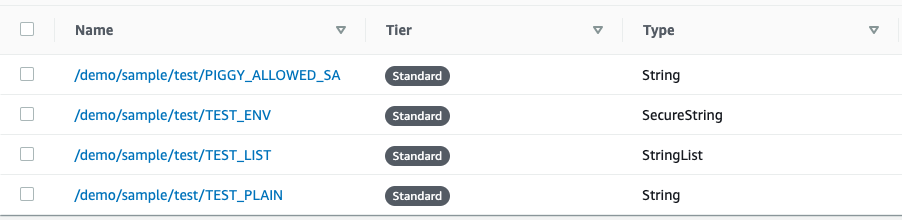
The annotation is
piggysec.com/aws-ssm-parameter-path: /demo/sample/test
And the environment variable are
- name: TEST_ENV
  value: piggy:TEST_ENV
- name: TEST_LIST
  value: piggy:TEST_LIST
- name: TEST_PLAIN
  value: piggy:TEST_PLAIN
The ssm:GetParametersByPath permission is required for reading from Parameter Store.
Example minimum policy for reading values from SSM Parameter Store:
{
  "Version": "2012-10-17",
  "Statement": [
    {
      "Sid": "PiggySSM",
      "Effect": "Allow",
      "Action": ["ssm:GetParametersByPath"],
      "Resource": "*"
    },
    {
      "Sid": "PiggyECRReadOnly",
      "Action": [
        "ecr:BatchCheckLayerAvailability",
        "ecr:BatchGetImage",
        "ecr:DescribeImages",
        "ecr:GetAuthorizationToken",
        "ecr:GetDownloadUrlForLayer"
      ],
      "Effect": "Allow",
      "Resource": "*"
    }
  ]
}
License
Licensed under the Apache License, Version 2.0 (the “License”); you may not use this file except in compliance with the License. You may obtain a copy of the License at
http://www.apache.org/licenses/LICENSE-2.0/
Unless required by applicable law or agreed to in writing, software distributed under the License is distributed on an “AS IS” BASIS, WITHOUT WARRANTIES OR CONDITIONS OF ANY KIND, either express or implied. See the License for the specific language governing permissions and limitations under the License.